

Skip to content
Visiosign logo blueblackVisiosign logo white
  • Our products
    • Digital signage software
    • Info screens
    • Meeting room screens
    • Guest registration
    • Wayfinding
  • Articles
  • Customer cases
  • Contact us
  • Danish
  • English
  • Swedish
Support

Want us to help you get started?

Fill out the form and we will get back to you as soon as possible.

Edit Content

Fejl: Kontaktformular ikke fundet.

Contact us
Articles

From manual staffing plans to digital overview

14. November 2025 Sandra Lütken Comments Off on From manual staffing plans to digital overview
Staff plans info screens

Many companies use manual staffing plans in Excel or similar programs. It works, but it can be time-consuming and cumbersome to update and share. That’s why more companies are choosing to digitize the process – and make it more visual.

A tailor-made template in Visiosign Cloud

Do you have a staffing plan that you update manually? We can help you take the next step. We design a template in Visiosign Cloud that matches your visual identity and needs. You enter the plan directly into the template – eliminating the need for spreadsheets and manual updates.

Automatic viewing with integration to your system

Do you already have a system where the staffing plan is updated? Then we can make the process even easier. With an integration to your existing system, Visiosign Cloud can automatically retrieve the staffing plan and display it on info screens – without manual updates.

This means that employees always see the latest version and you save time on administration. An integration ensures that information is correct, up-to-date and available where it’s needed most.

Overview on info screens

When the staffing plan is in Visiosign Cloud, it can be displayed directly on your info screens. This gives employees a clear overview of who is at work and when – without having to search for information.
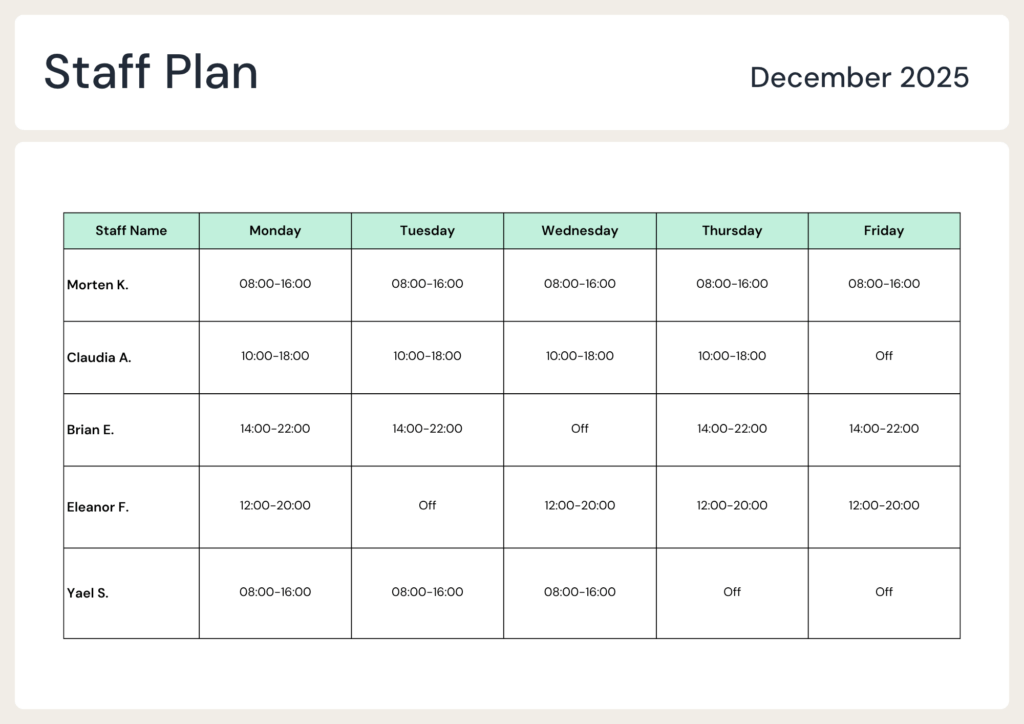
Bemandingsplan

We customize the solution for you

We design the template in close collaboration with you to match your visual expression and workflows. It should be easy to use and quick to update.

Ready to get started?

If you want a customized template for your staffing plan in Visiosign Cloud, contact us and we’ll help you find the solution that best suits your needs.

  • How to
  • New features
Sandra Lütken

Marketing Manager, Visiosign

Jeg er cand.merc.(kom.) fra CBS og har siden arbejdet med marketing for forskellige virksomheder. Jeg brænder for at skabe værdi gennem kommunikation og elsker at se den forskel, marketing kan gøre for en virksomhed.

Post navigation

Previous
Next

Search

Tags

How to New features News from Visiosign Release notes

Categories

  • Articles (5)
  • Customer case (3)
  • Help center (4)
  • Updates (1)

Related posts

stock images info screens
Articles

Use stock images for your posts

27. October 2025 Sandra Lütken Comments Off on Use stock images for your posts

At Visiosign, we are going through a process of change. We have a completely new look to mark that we are doing something new.

Release notes 1.25
Articles

Release notes 1.25

4. August 2025 Sandra Lütken Comments Off on Release notes 1.25

In the post types Image, Custom and Text & Image, you can now use stock photos from Unsplash in your posts.

Release notes 1.26
Articles, Updates

Release notes 1.26

4. August 2025 Sandra Lütken Comments Off on Release notes 1.26

In version 1.26 you can now insert video in text & image posts.

Want to receive news and updates?

Error: Contact form not found.

Visiosign logo

Skruegangen 2, 2690 Karlslunde

Contact info
  • Tel: +45 3963 3906
  • Phone hours Mon-Fri 8-16
  • info@dnpvisiosign.com
  • CVR no. 1275 9444
Resources
  • Help center
  • Webinars
  • Support
  • Release notes
Our products
  • Info screens
  • Meeting room screens
  • Wayfinding
  • Guest registration
Find us
  • Facebook
  • Linkedin
  • Contact us

All Rights Reserved.

  • Privacy Policy
  • Cookie policy